Builders are obsessed with big numbers. They think a 1000W label on a box makes their PC better or more stable. I see it every day in build forums and retail aisles. Most builders pay for a wattage ceiling they will never actually reach. This is a fundamental engineering error that drains your budget for no technical gain.
You need to understand the system power overhead before you drop cash on a high-end power supply. Manufacturers love selling you a massive ceiling because it has a high profit margin. They use words like “future-proofing” to scare you into overspending. In reality, you are likely paying for electricity and components you will never actually stress.
Efficiency data and technical load curves identify the ideal system power overhead to prevent overspending on unnecessary hardware. If you buy a massive unit and only draw a fraction of its capacity, you are actually losing efficiency. Your PC spends most of its life idling or doing light work. Buying a thousand-watt unit for a 300-watt load is a total waste of money.
Efficiency Curves and The Sweet Spot Logic
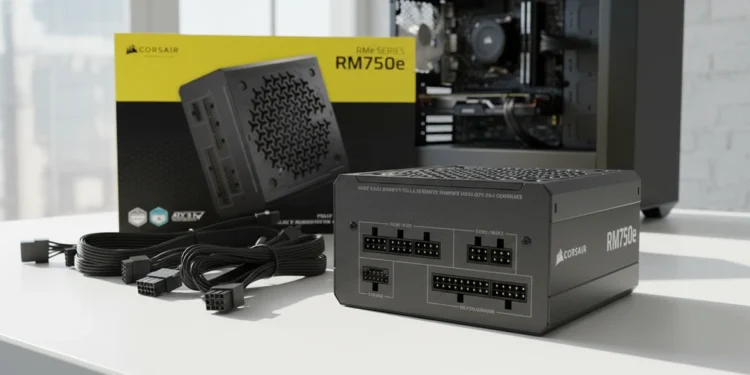
Efficiency isn’t just a marketing badge. Most power supplies hit their peak performance between 40% and 60% load. The Corsair RM750e is a technical win because it targets the actual power draw of a modern high-speed build. It carries an 80 Plus Gold rating. This means it stays efficient under real-world conditions.
You want your unit to work in its comfort zone. It shouldn’t sit idle at the bottom of its curve. It respects your money by giving you the performance you need without the “enthusiast tax” on the label. Many people ignore these curves because they want the “safest” option. They think more system power overhead means more safety.
That is a myth. A quality 750W unit is safer than a cheap 1000W unit every single time. Focus on the build quality instead of the number on the box. Don’t pay for a wattage ceiling that your hardware will never touch.
Hardware Truths Why ATX 3.0 Actually Matters
While I hate overpaying for wattage, I do believe in paying for modern standards. The 2023 version of the RM750e supports the ATX 3.1 and PCIe 5.1 standards. This is a genuine technical requirement for modern hardware. It means the unit is built to handle the power demands of the latest graphics cards.
Modern cards have massive, microscopic power spikes. An outdated power unit can shut down when these spikes happen. This unit is compliant with the latest standards to resist those transient power issues. This is a much better use of your cash than just buying more raw wattage.
Building a PC is becoming more expensive every month. See my data on how new tariffs are affecting technology prices and why you need to be surgical with your budget. Understanding these manufacturing shifts is the only way to stay ahead of the price hikes. It’s a smarter way to protect your other expensive components.
Noise Levels and The Fanless Performance Trap
Silence is a luxury that often comes at a high price in the tech world. Many high-wattage units brag about “Zero RPM” modes where the fan doesn’t spin at low loads. The RM750e handles this with a specially calculated fan curve. It uses a 120mm rifle bearing fan that keeps noise down even when operating at a full load.
I’ve seen “silent” fanless units fail because they can’t dissipate heat when the workload actually picks up. A quiet, active fan is a much better long-term investment for your system power overhead. It keeps the internal components cool without the annoying whine of a cheap fan.
You want a tool that stays out of the way. Don’t buy a silent heater for your case. The Modern Standby support is also a win here. It allows for extremely fast wake-from-sleep times and better efficiency when your computer is just sitting there.
Component Quality and High Efficiency Standards
The RM750e uses 105 degree Celsius rated capacitors. This is a specific technical marker of a reliable build. These parts are designed to deliver steady, dependable electrical performance even under stress. Manufacturers often hide the quality of their internal parts behind a flashy external casing, but these specs matter.
The modular cables are also a significant usability win. You only plug in the wires you actually need for your specific build. This reduces clutter and improves the airflow around your motherboard. Power delivery starts at the wall and travels through these cables to reach your board.
See my look at motherboard hardware limits to understand how that energy is managed once it hits your system. If you are paying for a thousand-watt unit, you are likely paying for a bundle of cables you will never use. Opting for a renewed unit can also save you a massive amount of cash if you know what to look for. It allows you to get flagship-grade hardware for the price of a budget unit.
Is Your Investment Respected
The system power overhead myth is a marketing tool designed to make you overspend. A thousand-watt unit is an engineering mistake for 90% of PC users. It sits outside its peak efficiency curve. This drains your budget that could be spent on a faster CPU or better storage.
The Corsair RM750e proves that you can get high-tier stability and modern ATX 3.1 features without the overkill markup. It respects your money by focusing on the specs that actually drive system stability. It’s a durable, quiet, and efficient foundation for a high-performance PC.
Buy a unit that fits your actual technical load and has the build quality to back it up. The math on a 750W Gold unit is the only one that makes sense for a savvy builder. Stop paying for a wattage ceiling you don’t need.
Check the current availability of the Corsair RM750e here to see if you can finally stop overpaying for your system power.
Corsair RM750e

Corsair RM750e Power Supply
Fully Module 750W ATX 3.1 Power Supply Unit – 12V-2×6 CAble, Cybernetics Efficiency, C-Rated Capacitors and Modern Standby Mode